Professional commercial display solution provider

- Home
-
Products
Professional commercial display solutions
-
About us
In good faith to customers
-
Service
Provide professional and meaningful advice
-
Knowledge Center
Innovation for development
- Contact us
How Can the LCD Display of an Outdoor Self-Service Terminal Be Protected Against Accidental Contact?
How Can the LCD Display of an Outdoor Self-Service Terminal Be Protected Against Accidental Contact?
Protecting the LCD display of an outdoor self-service terminal requires more than simply installing a protective layer over the panel. Because these terminals are used in public environments, the display may be exposed to accidental impacts, repeated touching, scratches, pressure from objects, vandalism, dust, rain, temperature changes, and direct sunlight.
A reliable protection strategy normally combines protective cover glass, appropriate surface hardness, mechanical reinforcement, optical bonding, a properly designed enclosure, weather sealing, and a suitable touch panel structure. The goal is to protect the LCD while maintaining touch sensitivity, sunlight readability, optical clarity, and long-term reliability.
For manufacturers developing ticketing machines, payment terminals, information kiosks, EV charging terminals, transportation terminals, and other outdoor self-service equipment, choosing a purpose-built Outdoor Display can significantly simplify the integration process.
Why Does an Outdoor Self-Service Terminal Need Extra LCD Protection?
An indoor display usually operates in a relatively controlled environment. An outdoor self-service terminal has to withstand unpredictable physical contact from many different users.
For example, a user may:
-
Press the display harder than necessary
-
Accidentally hit the display with a phone, bag, or personal item
-
Touch the surface with keys or other hard objects
-
Drop an object against the front panel
-
Lean against the terminal
-
Scratch the surface during repeated interaction
-
Attempt to clean the display using unsuitable materials
These situations create mechanical risks that are different from normal indoor monitor use.
Outdoor terminals also face environmental stresses. UV radiation, humidity, rain, dust, temperature fluctuations, and solar heating can gradually degrade protective materials and optical components. Duobond's outdoor LCD solutions are designed around requirements such as high brightness, wide operating temperatures, anti-reflective technologies, and weather-resistant construction.
Therefore, LCD protection should be considered as part of the complete display assembly rather than as an accessory added after the LCD has been selected.
Use Protective Cover Glass Over the LCD
The most direct way to protect an LCD in a public-facing terminal is to place a suitable protective cover glass in front of the display.
The cover glass acts as a physical barrier between the LCD and the external environment.
A properly designed cover glass can help protect against:
-
Accidental impact
-
Scratches
-
Repeated finger contact
-
Cleaning activity
-
Dust and environmental contamination
-
Minor mechanical pressure
For outdoor applications, the glass should be selected according to the expected mechanical and environmental conditions.
Important specifications include:
-
Glass thickness
-
Glass strength
-
Surface hardness
-
Optical transmission
-
Anti-glare treatment
-
Anti-reflection treatment
-
UV resistance
-
Edge finishing
-
Mounting method
Duobond Display provides customized protective cover glass as part of its display customization capabilities, allowing the glass dimensions, surface treatment, and mechanical structure to be adapted to the terminal design.
Why Is Surface Hardness Important?
Accidental contact does not always mean a major impact.
Repeated contact with keys, tools, rings, metal objects, or other hard materials can gradually create scratches on an unprotected display surface.
A harder external surface helps reduce visible wear during long-term public use.
For example, anti-glare LCD modules can incorporate hardened surface treatments. Duobond's commercial display modules include configurations using 3H surface hardness and anti-glare treatment, demonstrating how surface durability can be incorporated into the display design.
For an outdoor self-service terminal, however, the final protective layer should be selected according to the complete application rather than simply choosing the highest hardness specification.
A manufacturer should consider both:
Mechanical durability + optical performance
A very hard surface is not automatically the best solution if it introduces excessive reflection, reduces optical clarity, or affects touch performance.
Optical Bonding Provides Additional Mechanical Protection
Optical bonding is another useful technology for outdoor self-service terminals.
In a conventional display assembly, an air gap may exist between the LCD and the front protective glass or touch panel.
Optical bonding replaces this air gap with an optical adhesive layer.
This configuration can provide several advantages:
-
Reduces internal reflections
-
Improves sunlight readability
-
Reduces the possibility of dust entering the optical gap
-
Improves structural integration
-
Helps maintain optical clarity
-
Provides a more integrated front display assembly
Duobond describes optical bonding as a solution for outdoor displays that can reduce internal reflections while improving mechanical durability and visibility.
For a self-service terminal installed in direct sunlight, optical bonding is especially useful because reflected light from an air gap can make the display harder to read.
Should the Cover Glass Be Combined With a Touch Panel?
If the terminal requires user interaction, the protective structure normally needs to accommodate a touch panel.
A typical interactive outdoor display may consist of:
LCD module → touch panel → optical bonding layer → protective cover glass
The exact stack-up depends on the terminal's mechanical and electrical design.
For public self-service equipment, projected capacitive touch technology is commonly considered when users need a modern multi-touch interface. The touch panel can be customized to match the LCD dimensions and front-glass structure.
The key is to ensure that the protective layer does not compromise touch sensitivity.
The engineering team should evaluate:
-
Cover-glass thickness
-
Touch-controller compatibility
-
Touch sensitivity
-
Glove operation requirements
-
Water interference
-
Moisture resistance
-
Surface treatment
-
Optical bonding
-
Touch-panel edge sealing
This is particularly important for outdoor terminals because rain or condensation can create conditions that differ significantly from indoor touch applications.
How Does the Mechanical Frame Protect the LCD?
The protective glass itself should not be expected to absorb every mechanical load.
The surrounding frame also plays an important role.
A well-designed frame can protect the edges of the display and distribute external forces across the enclosure instead of transferring them directly to the LCD panel.
The frame should provide:
-
Secure glass support
-
Controlled mounting pressure
-
Edge protection
-
LCD clearance
-
Touch-panel support
-
Cable clearance
-
Water sealing
-
Service accessibility
The display should not be held in place by excessive pressure against the LCD panel.
Instead, the mechanical structure should be designed around the complete display stack.
Duobond provides customized frames, protective cover glass, mechanical frame design, and metal housing customization for display projects where standard modules may not match the final equipment structure.
How Can the Terminal Be Protected Against Stronger Impact?
If the self-service terminal is installed in a high-traffic public area, normal scratch resistance may not be sufficient.
For applications where accidental impact is a significant concern, the manufacturer should consider a stronger front assembly and reinforced enclosure.
The protective design can include:
-
Strengthened cover glass
-
Reinforced metal frame
-
Recessed display installation
-
Protected glass edges
-
Strong mounting brackets
-
Impact-resistant enclosure materials
-
Increased clearance around the LCD
A recessed display is particularly useful because the surrounding bezel can absorb some incidental contact before it reaches the glass surface.
However, the exact structure should be validated through mechanical testing rather than relying only on the appearance of the enclosure.
Why Should the Display Be Slightly Recessed?
A recessed display can provide an additional layer of mechanical protection.
Instead of placing the display surface completely flush with the outermost cabinet surface, the enclosure can position the display behind a protective bezel.
This helps reduce direct side impacts and protects the edges of the cover glass.
The design should still allow users to comfortably interact with the touch panel.
The ideal geometry depends on:
-
Touch interaction area
-
Viewing angle
-
Glass thickness
-
Bezel width
-
Terminal enclosure
-
Accessibility requirements
A recessed design can be especially useful for public terminals exposed to frequent accidental contact.
How Does Weather Sealing Protect the Display?
Accidental contact is only one part of outdoor display protection.
The display assembly must also prevent water and dust from reaching sensitive electronic components.
Rainwater can enter through:
-
Front-panel gaps
-
Cable openings
-
Frame joints
-
Ventilation openings
-
Button openings
-
Poorly sealed enclosure seams
Once moisture enters the display assembly, it can contribute to corrosion, adhesive deterioration, optical haze, and electronic failures.
Duobond's outdoor display solutions emphasize weather-resistant construction and protection against dust, moisture, and heat.
For a complete outdoor terminal, the LCD assembly and cabinet should therefore be designed as one environmental protection system.
Does High Brightness Help Protect the Display?
High brightness does not physically protect an LCD from accidental contact, but it is important for outdoor usability.
Direct sunlight can make a standard display difficult to read. Outdoor LCD modules therefore often use significantly higher brightness than conventional indoor displays.
For example, Duobond offers an 18.5-inch outdoor LCD module with 1000 cd/m² brightness, anti-glare optical treatment, and a wide operating temperature range of -20°C to +60°C.
High brightness should be combined with suitable optical treatments.
Otherwise, increasing backlight power alone may not solve the problem because reflected sunlight can still wash out the image.
Anti-Glare and Anti-Reflective Treatments Are Important
The outer surface of an outdoor terminal can reflect sunlight directly toward the user.
This can make the LCD appear dim even when the backlight is sufficiently bright.
Anti-glare (AG) treatment can diffuse reflected light, while anti-reflective (AR) treatment is designed to reduce surface reflection.
Duobond's outdoor-display technology content identifies AG and AR treatments as important technologies for improving outdoor viewing performance.
For a self-service terminal, the appropriate treatment depends on the installation environment and viewing conditions.
The designer should evaluate the display under actual sunlight rather than relying only on indoor testing.
Can UV Protection Extend the Life of the Display Assembly?
Yes.
Outdoor terminals may remain exposed to sunlight for thousands of hours over their service life. UV radiation can gradually degrade cover materials, adhesives, coatings, plastics, and other components.
UV-resistant cover glass and UV-stable optical materials can help slow this degradation.
Duobond's outdoor LCD guidance specifically recommends UV-resistant cover glass, UV-stable optical bonding materials, weather-resistant enclosure designs, and industrial-grade components for long-term outdoor installations.
This is particularly relevant for self-service terminals expected to operate continuously for several years.
What About Temperature Changes?
Outdoor self-service terminals can experience large temperature variations.
A display may be exposed to low temperatures during winter and significant solar heating during summer.
The LCD, touch panel, optical adhesive, backlight, and electronic components should therefore be selected according to the expected operating temperature range.
Outdoor LCD solutions may use wide-temperature specifications such as -20°C to +60°C or even broader ranges depending on the product. Duobond currently lists outdoor modules with operating ranges reaching -40°C to +85°C.
Thermal management should also account for heat generated inside the terminal enclosure.
What Is the Recommended Protection Structure?
For many outdoor self-service terminals, a practical display architecture can be structured as:
Outdoor enclosure → protective bezel → cover glass → touch panel → optical bonding → LCD module → backlight/electronics → rear mounting structure
Not every project requires every layer.
The final configuration depends on whether the terminal needs:
-
Touch functionality
-
High impact resistance
-
High brightness
-
Optical bonding
-
UV resistance
-
Anti-glare treatment
-
Anti-reflection treatment
-
Wide-temperature operation
-
Water and dust protection
The important principle is to treat the display as an integrated system.
What Should Manufacturers Test Before Mass Production?
Before moving an outdoor self-service terminal into mass production, manufacturers should validate both the display and the complete enclosure.
Useful evaluations include:
Impact Testing
Check whether the cover glass and mounting structure can tolerate the expected accidental contact.
Scratch Testing
Evaluate whether repeated contact with common objects produces unacceptable surface damage.
Touch Testing
Verify touch accuracy after the protective glass and bonding layers have been installed.
Water and Dust Testing
Evaluate the complete terminal enclosure rather than only the LCD module.
Temperature Testing
Test the display under the expected high- and low-temperature conditions.
UV and Aging Testing
Evaluate optical materials and protective surfaces for long-term outdoor exposure.
Sunlight Testing
Test readability under direct and indirect sunlight.
Long-Duration Operation
Operate the complete terminal for extended periods while monitoring temperature, brightness, touch performance, and image stability.
These tests are more useful than evaluating the LCD panel in isolation because many failures occur at the interfaces between the display, protective structure, electronics, and enclosure.
What Is the Best Way to Protect an Outdoor Self-Service Terminal LCD?
There is no single protective component that solves every outdoor display problem.
The most reliable approach is to combine:
| Protection Requirement | Recommended Design Approach |
|---|---|
| Accidental contact | Protective cover glass |
| Scratches | Hardened surface treatment |
| Stronger impact | Reinforced frame and strengthened glass |
| Touch interaction | Integrated PCAP touch panel |
| Internal reflections | Optical bonding |
| Sunlight readability | High-brightness LCD + AG/AR treatment |
| UV exposure | UV-resistant glass and optical materials |
| Rain and humidity | Sealed enclosure and suitable gaskets |
| Dust | Sealed front assembly |
| Temperature changes | Wide-temperature LCD components |
| Heat accumulation | Thermal management and ventilation |
| Long-term public use | Complete mechanical and environmental validation |
The exact combination should be selected according to the terminal's location, operating conditions, expected user behavior, and service-life requirements.
Frequently Asked Questions
Can protective glass prevent all damage to an outdoor LCD?
No. Protective glass significantly reduces the risk of scratches and accidental contact damage, but the complete assembly still requires suitable mechanical support and enclosure protection.
Is optical bonding necessary for an outdoor self-service terminal?
It is not mandatory for every project, but it can provide important optical and structural benefits. Optical bonding reduces internal reflections and can improve outdoor readability while creating a more integrated display assembly.
Can an outdoor LCD display be used with a touch panel?
Yes. Outdoor LCD modules can be integrated with capacitive touch panels and customized cover glass. The complete touch stack should be designed together to maintain touch sensitivity and optical performance.
What brightness is suitable for an outdoor self-service terminal?
The required brightness depends on the amount of direct sunlight. Outdoor products commonly use high-brightness configurations, with Duobond offering products around 1000 cd/m² and other configurations depending on the application.
How can the LCD be protected from rain?
The LCD should be integrated into a properly sealed front assembly and enclosure. Gaskets, frame design, cable-entry sealing, drainage, and the overall enclosure structure should all be considered.
Can the protective cover glass be customized?
Yes. Custom cover glass can be designed according to the LCD dimensions and terminal structure, including glass dimensions, thickness, surface treatment, and mechanical finishing. Duobond also provides customized frame and housing solutions.
Conclusion
Protecting the LCD display of an outdoor self-service terminal against accidental contact requires a complete mechanical and optical strategy. Protective cover glass provides the first physical barrier, while a reinforced frame protects the edges and distributes mechanical loads. Optical bonding can improve both optical performance and structural integration, while AG/AR treatments help maintain readability under sunlight.
For truly outdoor installations, protection must extend beyond accidental contact. UV resistance, water and dust sealing, high brightness, wide-temperature operation, thermal management, and long-term environmental testing are equally important.
For OEM and ODM manufacturers, the most effective solution is to select an Outdoor Display that can be customized around the terminal's mechanical, optical, touch, and environmental requirements. Duobond Display provides outdoor LCD modules and customization services including touch integration, optical bonding, protective cover glass, high-brightness configurations, mechanical frames, and other display components to help manufacturers develop complete outdoor self-service display assemblies.
Recommended reading
 2026-06-30What is High Haze Anti-Glare Glass for Advertising Displays?
 2026-06-30Optimizing Display Legibility for Outdoor EV Charging Infrastructure: A Technical Guide to Sunlight-Readable LCD Design
 2026-06-29How Curved LCD Displays Ensure 24/7 Reliability in High-Traffic Gaming Environments
 2026-06-23How Many Nits of Brightness Are Required for an EV Charging Station Display to Be Sunlight-Readable?
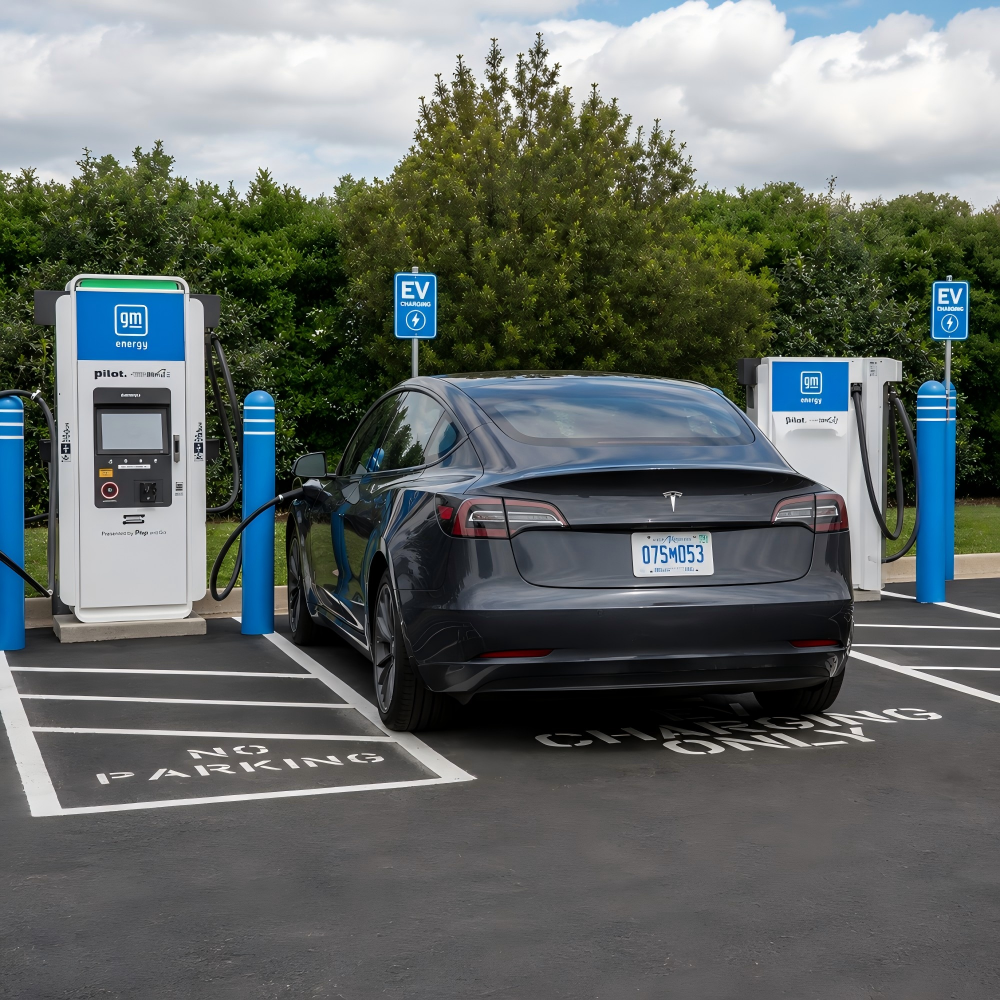 2026-06-23What Touch Technology Is Best for EV Charging Station LCD Displays?

Products
Commercial LCD Display
Gaming LCD Module
Outdoor Display
MINI-LED LCD Display
High Resolution Medical Display
OLED Display
Total Solutions
E-ink LCD Display
Desk VR Monitor
Service
Custom Touch Screen Solutions
Customized Frames & Protective Cover Glass
LCD Driver Board & Accessory Customization
Contact us
Contact Us
Copyright © 2025 Shenzhen Aptus Technology Co.,Ltd All Rights Reserved.

-
Inquire
- Top