Professional commercial display solution provider

- Home
-
Products
Professional commercial display solutions
-
About us
In good faith to customers
-
Service
Provide professional and meaningful advice
-
Knowledge Center
Innovation for development
- Contact us
How to Improve Touch Accuracy in Outdoor LCD Display Applications?
How to Improve Touch Accuracy in Outdoor LCD Display Applications?
Improving touch accuracy in outdoor LCD display applications requires more than increasing touch sensitivity. A reliable outdoor touch display needs a properly matched PCAP touch panel, touch controller, cover glass, optical bonding structure, EMI protection, grounding system, thermal design, and firmware tuning. Rainwater, wet fingers, gloves, sunlight, temperature changes, electromagnetic interference, and mechanical stress can all cause missed touches, inaccurate coordinates, or false touches. For outdoor kiosks, EV charging stations, parking terminals, self-service machines, transportation equipment, and commercial displays, the most effective approach is to optimize the entire touch display assembly rather than treating the touch panel as an isolated component.
Why Is Touch Accuracy More Difficult Outdoors?
Indoor touch displays usually operate in relatively controlled conditions. Users interact with the display using bare fingers, the surface remains dry, and the surrounding electronics generate limited electrical interference.
Outdoor LCD display applications are considerably more demanding. A touch panel may need to operate under direct sunlight, rain, condensation, high humidity, temperature fluctuations, dust, vibration, gloves, and electromagnetic noise from power electronics.
Projected capacitive (PCAP) touch technology detects changes in an electrical field. Because water and other conductive materials can also alter capacitance, rain droplets or water films can interfere with the touch signal. As water accumulates, the controller may have increasing difficulty distinguishing intentional finger input from environmental interference.
This means that simply increasing touch sensitivity is usually not the correct solution. Excessive sensitivity can actually make false-touch problems worse.
Use an Outdoor-Optimized PCAP Touch Panel
The first step toward improving touch accuracy is selecting a PCAP touch panel designed for the actual outdoor environment.
A standard consumer touch panel may perform well inside a tablet or indoor kiosk but may not provide sufficient noise immunity or water tolerance for outdoor equipment.
An outdoor touch panel should be evaluated for:
-
Water and rain rejection
-
Wet-finger operation
-
Glove touch capability
-
EMI resistance
-
Wide-temperature operation
-
Long-term stability
-
Multi-touch performance
-
Cover-glass compatibility
-
Mechanical integration
For commercial outdoor equipment, it is important to evaluate the touch panel together with the LCD rather than selecting the two components independently.
A properly engineered outdoor display solution can combine high-brightness LCD technology, PCAP touch, protective glass, optical bonding, waterproof construction, and customized mechanical integration.
For projects requiring a complete outdoor commercial display, you can review outdoor LCD display solutions designed for demanding commercial environments.
Optimize Touch Controller Sensitivity and Firmware
Touch-controller configuration has a major effect on accuracy.
A controller must maintain enough sensitivity to detect a genuine finger while rejecting environmental signals caused by water, electrical noise, gloves, or mechanical interference.
Outdoor applications therefore require careful adjustment of parameters such as:
-
Touch threshold
-
Noise filtering
-
Baseline tracking
-
Debounce time
-
Water rejection
-
Glove mode
-
Palm rejection
-
Edge compensation
-
Touch reporting rate
The objective is not maximum sensitivity. The objective is an appropriate signal-to-noise ratio.
For example, if the controller is configured with excessive sensitivity, small water droplets may be interpreted as touch events. If sensitivity is reduced too aggressively, users wearing gloves may experience missed touches.
Water-rejection algorithms are particularly important. Advanced touch firmware can analyze the characteristics of detected signals and distinguish between water interference and intentional user interaction.
The final firmware configuration should therefore be tested using the actual LCD, touch sensor, cover glass, cable, enclosure, and power supply.
Reduce False Touches Caused by Rain and Water
Rain is one of the most common causes of inaccurate touch operation outdoors.
Water droplets can change the capacitance measured by a PCAP sensor. When droplets merge into larger water films, the resulting electrical interference can become more difficult to distinguish from an actual finger touch.
Several design measures can improve water tolerance.
Use Water-Rejection Algorithms
The touch controller should support algorithms specifically designed to identify and reject water-related signals.
This is especially important for:
-
Outdoor payment terminals
-
EV charging stations
-
Parking kiosks
-
Ticketing machines
-
Outdoor information terminals
-
Self-service retail equipment
Control Water Accumulation
Mechanical design also matters.
A display installed vertically or at a suitable angle can allow water to flow away from the active touch area instead of accumulating on the surface. The bezel should also avoid creating channels where water can remain around the edges.
A hydrophobic surface treatment can further reduce water retention in certain applications.
Test Different Rain Conditions
Testing should not be limited to light water spray.
A realistic validation program should consider:
-
Light rain
-
Heavy rain
-
Water droplets
-
Water films
-
Wet fingers
-
Repeated touch under wet conditions
-
Condensation after temperature changes
The required performance should be defined according to the application rather than simply specifying that the display is “waterproof.”
Improve Glove Touch Accuracy
Outdoor operators may not always use bare fingers.
Construction workers, service technicians, drivers, maintenance personnel, and outdoor consumers may interact with the display while wearing gloves.
However, conventional gloves can significantly reduce the electrical signal reaching a capacitive sensor. Thick or electrically insulating gloves are particularly challenging.
To improve glove touch performance, engineers should define the actual glove type before selecting the touch solution.
Different gloves can produce substantially different results, including:
-
Thin fabric gloves
-
Winter gloves
-
Rubber gloves
-
Leather gloves
-
Industrial work gloves
-
Conductive gloves
A controller can then be tuned for the expected glove characteristics.
It is important not to optimize glove sensitivity without considering water rejection. Increasing sensitivity may improve operation with thick gloves but can simultaneously increase susceptibility to rain and electrical noise.
This is why outdoor touch design is fundamentally a system-level optimization problem. Recent industry guidance also emphasizes that glove operation and water rejection must be evaluated together rather than treated as independent specifications.
Use the Correct Cover Glass Thickness
Cover glass directly affects touch signal strength.
When a thicker protective glass is installed above the touch sensor, the distance between the user's finger and the sensing electrodes increases. This can reduce the available touch signal and make accurate detection more difficult.
Outdoor equipment may require thicker glass because of:
-
Impact protection
-
Vandal resistance
-
IK requirements
-
Environmental durability
-
Mechanical protection
However, simply increasing glass thickness without adjusting the touch sensor and controller can negatively affect touch performance.
Therefore, the cover-glass thickness, sensor structure, electrode design, controller sensitivity, and firmware should be evaluated as one system.
For applications requiring high durability, manufacturers can also consider chemically strengthened glass or other protective structures while maintaining adequate touch sensitivity.
Improve Optical Bonding
Optical bonding can improve both display visibility and touch-system stability.
In an optically bonded display, the air gap between the LCD and cover glass is replaced with an optical adhesive layer.
This structure can:
-
Reduce internal reflections
-
Improve sunlight readability
-
Reduce internal condensation
-
Increase structural rigidity
-
Improve visual contrast
-
Help maintain a more stable touch assembly
Outdoor displays are frequently exposed to temperature changes. If the internal structure contains an air gap, condensation and environmental changes can become more difficult to manage.
Optical bonding is therefore particularly valuable when the display must remain readable and touch-responsive under direct sunlight and changing weather conditions.
For outdoor commercial applications, optical bonding should be considered together with the touch sensor and cover glass instead of being treated as an optional cosmetic feature.
Improve EMI Shielding and Grounding
Electromagnetic interference is another major cause of unstable touch performance.
Outdoor equipment may contain high-power electronic components such as:
-
Switching power supplies
-
EV charging modules
-
Motor controllers
-
LED drivers
-
Communication modules
-
DC/DC converters
-
Industrial control electronics
These components can generate electrical noise that interferes with capacitive touch sensing.
Poor grounding can make the situation worse.
Common integration problems include floating metal housings, inappropriate grounding paths, poorly shielded cables, and touch cables routed too close to power lines.
To improve touch stability:
-
Use appropriate shielded touch cables.
-
Keep touch signal cables away from high-current power cables.
-
Establish a stable grounding architecture.
-
Avoid unnecessary ground loops.
-
Provide appropriate EMI shielding.
-
Separate sensitive touch signals from high-noise power circuits.
-
Test the display with the final enclosure installed.
The key point is that touch accuracy should be tested inside the actual equipment rather than on a laboratory touch panel alone.
Optimize Touch Cable Routing
Touch cables are often overlooked during product integration.
A long FPC or cable can act as an antenna and pick up electromagnetic interference from nearby power electronics.
This can lead to:
-
Random touch points
-
Intermittent touch failure
-
Touch coordinate drift
-
Delayed response
-
False triggering
Cable routing should therefore be considered during the mechanical design stage.
Where possible, keep the touch signal path short and separated from high-current or high-frequency circuits. Shielding and appropriate grounding should also be considered when the display is installed near strong interference sources.
Maintain Stable Operating Temperature
Outdoor displays may experience significant temperature changes.
High temperatures can affect electronic components, adhesives, touch-controller stability, and mechanical dimensions. Low temperatures can also change the electrical characteristics of the touch system and reduce the effectiveness of conventional gloves.
The touch solution should therefore be specified according to the actual operating temperature range.
Thermal management may include:
-
Heat dissipation structures
-
Thermal conductive materials
-
Ventilation
-
Heat sinks
-
Temperature-controlled electronics
-
Appropriate enclosure design
-
Sun shields where appropriate
A high-brightness outdoor LCD can generate considerable heat, particularly when operating continuously under direct sunlight. The thermal design of the LCD backlight and touch electronics should therefore be evaluated together.
Improve Mechanical Integration
Touch accuracy can also be affected by the physical structure surrounding the sensor.
Metal bezels, mounting frames, screws, brackets, grounding points, and enclosure structures can influence the electrical field around the touch sensor.
If a metal structure is too close to the active sensing area or is improperly grounded, edge sensitivity and coordinate stability may be affected.
Mechanical engineers should therefore consider:
-
Bezel dimensions
-
Sensor-to-metal spacing
-
Grounding points
-
Cover-glass mounting pressure
-
Adhesive thickness
-
Display flatness
-
Enclosure tolerances
-
Waterproof sealing
This is particularly important for custom outdoor displays where the LCD, touch panel, protective glass, and housing are designed as one assembly.
Calibrate the Touch Panel After Final Assembly
One of the most important steps is final-system calibration.
A touch panel that works accurately on a test bench may behave differently after installation into the final product.
The final assembly may introduce:
-
Metal enclosure interference
-
Different grounding conditions
-
Additional glass
-
Cable routing changes
-
EMI from the power supply
-
Mechanical stress
-
Different operating temperatures
Therefore, calibration should be performed after the display is installed into the final enclosure.
Testing should cover different areas of the screen, especially the edges and corners, because these areas can be more sensitive to mechanical and electrical boundary conditions.
Test Touch Accuracy Under Real Outdoor Conditions
Laboratory testing alone is not sufficient for a commercial outdoor display.
A comprehensive validation program should reproduce the conditions expected in actual deployment.
Important tests include:
Dry-finger test: Confirm normal touch accuracy and response time.
Wet-finger test: Verify that users can operate the display after exposure to moisture.
Rain test: Evaluate false-touch rejection and intentional touch detection.
Glove test: Use the exact gloves expected in the target application.
Temperature test: Evaluate touch performance across the specified operating temperature range.
EMI test: Operate the display near the actual power electronics and communication equipment.
Sunlight test: Evaluate display readability and touch operation simultaneously under strong ambient light.
Edge test: Verify touch accuracy close to the bezel.
Long-duration test: Confirm that touch performance remains stable during continuous operation.
These tests help identify whether a touch problem originates from the sensor, controller, firmware, grounding, enclosure, power system, or environmental conditions.
What Is the Best Structure for an Outdoor Touch LCD Display?
For demanding outdoor commercial applications, a reliable display architecture may combine:
-
High-brightness TFT LCD
-
Industrial-grade PCAP touch panel
-
Optimized touch controller
-
Water-rejection firmware
-
Chemically strengthened cover glass
-
Optical bonding
-
EMI shielding
-
Shielded touch cables
-
Stable grounding
-
Wide-temperature components
-
Waterproof enclosure
-
Optimized thermal management
The exact configuration should depend on the application environment rather than using a standard configuration for every project.
For example, an EV charging station may prioritize water rejection, EMI resistance, glove operation, and impact protection, while an outdoor advertising kiosk may place greater emphasis on sunlight readability, thermal management, continuous operation, and vandal-resistant construction.
Common Mistakes That Reduce Outdoor Touch Accuracy
Several design decisions can cause touch problems even when the LCD and touch panel themselves are high quality.
One common mistake is using an indoor-oriented PCAP panel in an outdoor product.
Another is increasing touch sensitivity without improving water rejection. This may solve missed touches while creating more ghost touches.
Ignoring grounding and EMI is another frequent problem, especially in equipment containing high-power electronics.
Engineers may also test the touch panel without the final cover glass or enclosure. This can produce misleading results because the final mechanical structure can significantly change touch behavior.
Finally, specifying only “waterproof” or “IP65” is not enough to define touch performance. A sealed enclosure can protect electronics from water while the touch surface may still experience false touches caused by water droplets.
How to Specify an Outdoor Touch Display
When requesting an outdoor LCD touch solution from a display manufacturer, provide as much application information as possible.
Important specifications include:
-
LCD size
-
Resolution
-
Required brightness
-
Viewing direction
-
Touch technology
-
Number of simultaneous touch points
-
Cover-glass thickness
-
Glove type
-
Rain exposure
-
Operating temperature
-
Storage temperature
-
Installation orientation
-
Enclosure material
-
EMI environment
-
Interface requirements
-
Optical bonding requirements
-
Waterproof requirements
-
Impact protection requirements
This information allows the display supplier to evaluate the complete touch architecture rather than simply recommending a standard LCD module.
Final Answer
The most effective way to improve touch accuracy in outdoor LCD display applications is to optimize the complete touch-display system. Use an outdoor-rated PCAP touch panel, tune the controller for water and glove operation, select an appropriate cover-glass structure, use optical bonding where appropriate, improve grounding and EMI shielding, optimize cable routing and thermal management, and perform calibration and validation after final mechanical assembly.
For commercial outdoor equipment, touch accuracy should be treated as a system-level engineering requirement rather than a single touch-panel specification. A display that remains readable in sunlight but produces ghost touches during rain is not a successful outdoor display solution. Likewise, a panel that rejects rain effectively but cannot detect the operator's gloves may not meet the actual application requirements.
For outdoor kiosks, EV charging equipment, parking terminals, self-service machines, transportation systems, and outdoor advertising equipment, selecting a display supplier capable of coordinating the LCD, touch panel, cover glass, bonding, controller, and mechanical integration can significantly reduce development risks.
Duobond Display provides outdoor commercial display solutions that can be configured around application-specific requirements such as high brightness, touch functionality, environmental protection, and custom mechanical integration. For projects requiring a display designed for demanding outdoor environments, explore the outdoor display solutions available from Duobond Display.
Recommended reading
 2026-06-30What is High Haze Anti-Glare Glass for Advertising Displays?
 2026-06-30Optimizing Display Legibility for Outdoor EV Charging Infrastructure: A Technical Guide to Sunlight-Readable LCD Design
 2026-06-29How Curved LCD Displays Ensure 24/7 Reliability in High-Traffic Gaming Environments
 2026-06-23How Many Nits of Brightness Are Required for an EV Charging Station Display to Be Sunlight-Readable?
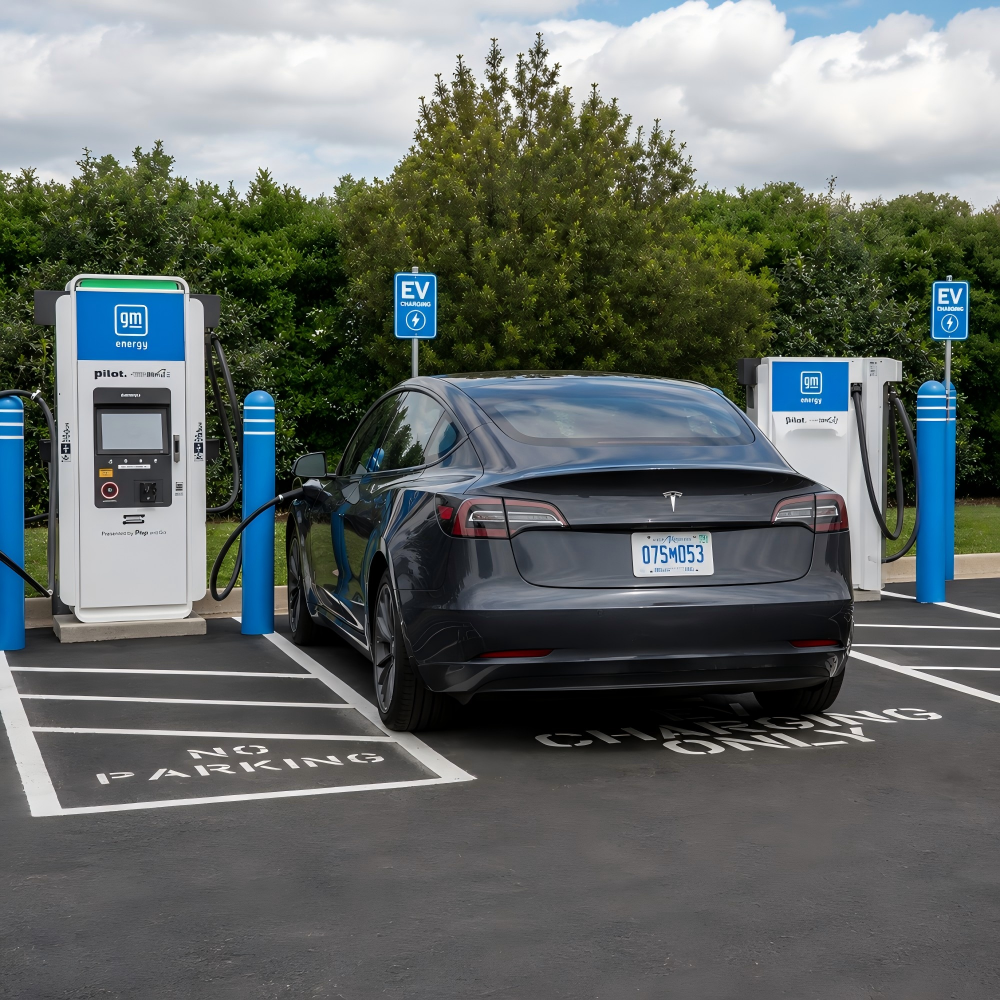 2026-06-23What Touch Technology Is Best for EV Charging Station LCD Displays?

Products
Commercial LCD Display
Gaming LCD Module
Outdoor Display
MINI-LED LCD Display
High Resolution Medical Display
OLED Display
Total Solutions
E-ink LCD Display
Desk VR Monitor
Service
Custom Touch Screen Solutions
Customized Frames & Protective Cover Glass
LCD Driver Board & Accessory Customization
Contact us
Contact Us
Copyright © 2025 Shenzhen Aptus Technology Co.,Ltd All Rights Reserved.

-
Inquire
- Top